

Most of us have never once sat down and made an intentional decision about what lives on the home screen of our phone. We download something, it lands wherever it lands, and over time we end up with a screen full of apps we barely use sitting right next to the ones we actually need, and we wonder why we pick up our phone to check the time and somehow end up 20 minutes deep into something we never meant to open.
Your home screen is either working for you or against you, and the good news is it takes about 15 minutes to fix.
1. Start with a list, not your phone.
Before you move a single app, grab a piece of paper and write down the apps you genuinely want or need to access every day for intentional reasons. Your calendar, your camera, your maps, your music. Notice that word intentional, because games and social media apps are going to want to sneak onto this list and they need their own honest conversation. Keep this list short. If you are reaching for something once a week or less, it does not belong on your home screen.
2. Have an honest conversation about social media.
This is the part most people skip. If social media apps are on your home screen, that is fine, but only if notifications are completely off. The goal is that you choose when you go in, not that the app summons you every time you pick up your phone to do something else entirely. If you cannot see yourself turning off those notifications, move those apps off the first screen. Out of sight genuinely does reduce the pull.
3. Clear everything that didn't make the list.
Once you know what belongs, remove everything else from your home screen. It does not mean deleting the apps, just moving them off that first screen so they are not sitting there creating visual temptation every time you unlock your phone. The fewer things competing for your attention the moment you open your device, the easier it is to do the thing you actually picked it up to do.
Do this today.
It takes less time than you think and the difference is immediate. When your home screen only holds the things you chose to put there, your phone starts feeling like a tool again instead of a trap. 🩷

- TOP for Students - Coming Summer 2026! Pre-Order Now.

If you have a student at home juggling six classes, a packed schedule, and the weight of figuring it all out, TOP for Students was made for them!
It's a 4-step planning system that teaches middle schoolers through college students how to manage their time, deadlines, and workload from the big picture all the way down to the daily check-in, because honestly, no one ever teaches them how to do this.
The course is designed for the student to watch and work through, so they can start taking real ownership of their schedule. It's currently available as a pre-order at $67, and you can grab 20% off with code STUDENT at checkout (code expires May 31!). - The Skylight Calendar
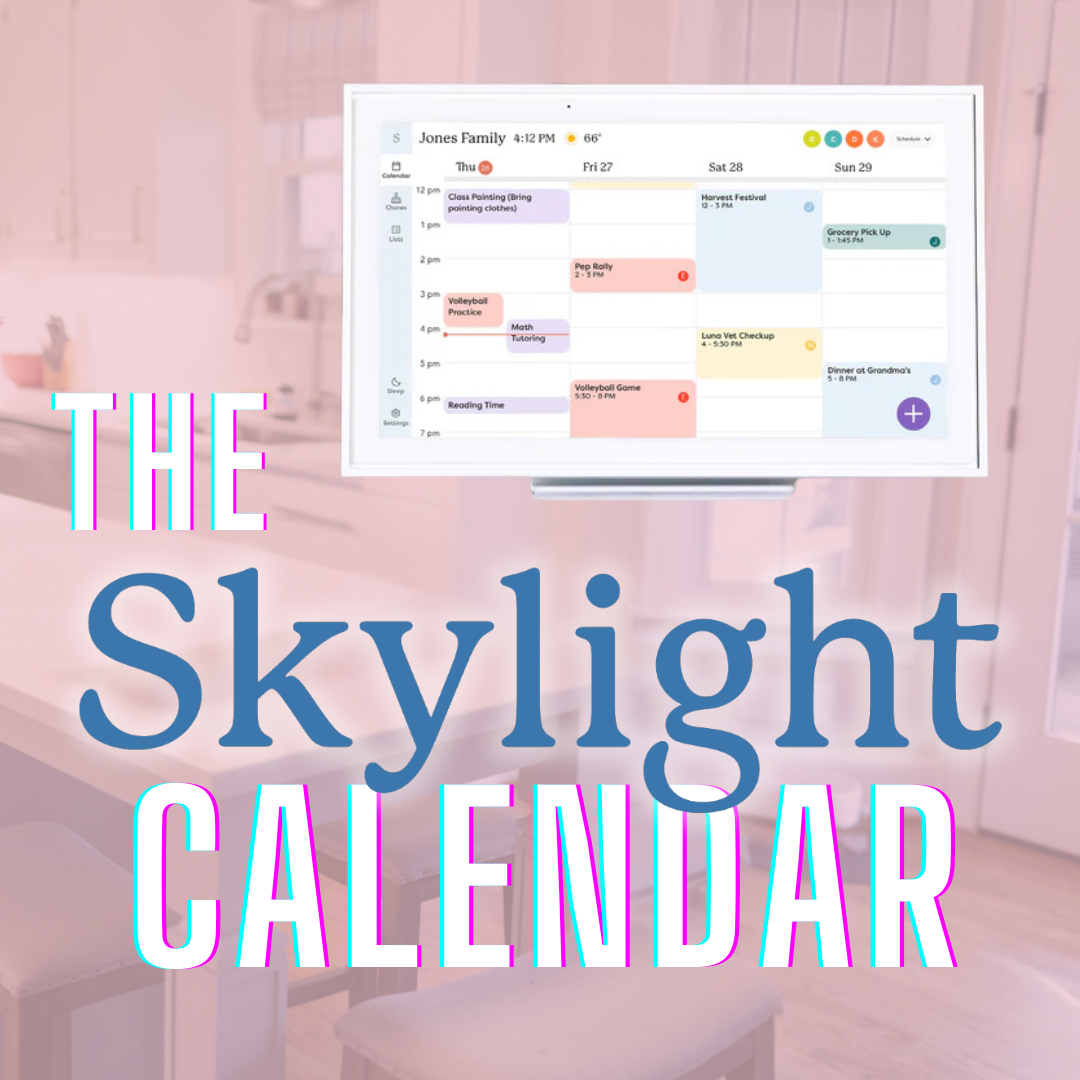
Getting the whole household on the same page shouldn't require a group chat, three reminders, and a minor argument!
The Skylight Calendar keeps your entire family's schedule visible in one place so everyone always knows what's happening, what's coming up, and where they need to be without anyone having to ask. No more missed pickups, forgotten practices, or "you never told me." It syncs with the calendars you already use and just quietly keeps your household running. Use code THEPINKBEE at checkout for 15% off

Why Daily Planners Don't Work for Women And What Actually Does
What if the reason your plan never sticks has nothing to do with willpower, discipline, or motivation?
In this week's video, we are getting into something most productivity advice completely ignores: your biology. Mainstream productivity systems were designed for men, and once you understand how your 28-day hormone cycle actually affects your energy, focus, and ability to get things done, the whole "why can't I just stick to a plan" question starts to make a lot more sense.
|


Where Should My Backlog Actually Live?
Your backlog only works if you can actually use it, and this week I'm answering two listener questions that get right to the heart of that.
We're talking about why paper usually isn't the right home for your backlog, what digital tools work well, and what to do when you have to-do items scattered across five different lists and apps, and you're not sure whether to delete them or start over. Short answer: Don't delete anything yet.
Remember, this video is updated every Wednesday, so don’t miss it! Head to The Pink Bee app to watch now.

Friend, don’t forget, just 15 minutes of planning today can set the tone for your entire week. You’ve got the tools, you’ve got the tips, and now it’s time to take action. Let’s crush this week together!







Responses